Вход на сайт
тема ещё не закрыта



NEW 17.02.06 13:02
Всё правильно spacklsp.dll это от T-Online DSL-Manager .И его "лечение" данной сверху прогой мало что даст(имхо).Как ты правильно написал нужно избавится от T-Online Software вобще. И как Генди правильно написал от Нортона тоже..
Если Вы все перепробовали и ничего не помогает, то прочтите инструкцию!


NEW 17.02.06 13:37
 Прикреплённые файлы
NEW 17.02.06 13:48
в ответ swetusik 17.02.06 13:37
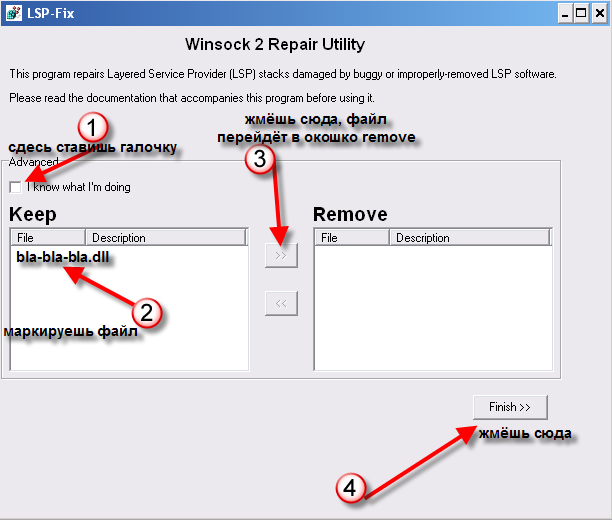
LSP-FIX - Winsock 2 repair utility
==================================
This program attempts to correct Internet connection problems resulting from buggy or improperly-removed Layered Service Provider (LSP) software. When you start LSP-Fix, it will read the list of LSP modules from the Windows registry and verify that each module is present. If a module is missing, it is placed on the "Remove" list for removal. Advanced users can override suggested removals in the "Advanced" area. When "Finish" is pressed, the undesired entries are removed, and the remaining entries in the registry are renumbered to make them consecutive. The total module counts are then updated. Finally, the program will display a summary of the changes that were made.
FOR THE CHANGES TO TAKE EFFECT, IT MAY BE NECESSARY TO RESTART YOUR COMPUTER. After restarting, connect to the Internet normally and try accessing a Web domain such as http://www.google.com to check that your connection is working properly. If you still cannot access Web sites, see the "Recovering From Disaster" section below for other possible fixes.
Since some errors result from misnumbered LSP entries rather than missing modules, the "Remove" list may be empty. Don't worry if this is the case; the misnumbered entries will be corrected when you press "Finish".
Please do not check the "I know what I'm doing" box unless you really know what you're doing. This option is for advanced users only and is not necessary to repair your system.
** IMPORTANT **
There is a known issue with using this software in combination with obsolete versions of Lavasoft's popular AD-Aware utility. A known issue in some versions of AD-Aware results in improper removal of pests such as New.Net, CommonName, and WebHancer, resulting in lost Internet access. If LSP-Fix is used subsequently to repair these errors, the system may begin exhibiting crashes in MSAFD.DLL and/or RPCSS. This can be fixed by performing a "hard restore" of Windows' networking components. This involves uninstalling the "Communications" item in Windows setup, deleting the Winsock2 registry key, and reinstalling Communications. http://support.earthlink.net/mu/1/psc/img/walkthroughs/windows_9x_nt/dialers/dun_1.3/5289.psc.html explains this procedure in detail.
If you have additional information about what this version of AD-Aware does to mess up Winsock, or have a system this has happened on that doesn't need to be repaired immediately, please email me: winsock "at" cexx.org so I can figure out what is going on and fix it. I have so far been unable to reproduce this issue, and consequently, unable to update LSP-Fix to deal with it.
Notes
-----
No changes will be made until you press the 'Finish' button. To exit without making any changes, simply close the program instead of pressing Finish.
It makes no difference which order the module entries appear in. LSP-Fix will retain the entries in the order that they appear in the Registry. (In other words, shuffling them around on the Keep/Remove lists has no effect.)
LSP-Fix is not a malware removal utility and does not target specific products. LSP-Fix does not delete any files.
Recovering From Disaster
------------------------
I make the assumption that your system actually does use Winsock 2 (all Win98 and higher do). If you are running Windows 95 and are not sure if Winsock 2 has been installed on your system, it should be re-installed. The file is available from the Microsoft Web site or (probably) windowsupdate.microsoft.com .
If the Winsock2 Registry keys are missing entirely (LSP-Fix returns an error) or damaged beyond repair, it will be necessary to restore them. A brief walkthrough of this procedure is available at http://cexx.org/winsock.htm .
Some LSP products may overwrite system files such as 'wsock32.dll'. If this has occurred, or you still cannot access Web sites, it may be necessary to re-install Winsock 2 (or Windows) to restore the original files.
Crashes in RPCSS or MSAFD: Please see the section marked **IMPORTANT** above (under "LSP-FIX - Winsock 2 repair utility") for an explanation of the problem and how to fix it.
Requirements
------------
Windows 95 with Winsock 2, Windows 98, Windows ME, Windows XP, or Windows 2000.
Other
-----
To provide a faster download, the LSP-Fix program is compressed using UPX, the Ultimate Packer of eXecutables. Please visit the UPX homepage at http://www.upx.org if you are interested in compressing your own software.
Butt Covering
-------------
This software is provided AS-IS, without any warranty of any kind, either express or implied. No lifeguard on duty. Registry Edit at your own risk.
Here come the all-caps. This means you should read it twice.
TO THE MAXIMUM EXTENT PERMITTED BY APPLICABLE LAW, IN NO EVENT SHALL cexx.org OR ITS STAFF BE LIABLE FOR ANY SPECIAL, INCIDENTAL, INDIRECT, OR CONSEQUENTIAL DAMAGES WHATSOEVER (INCLUDING, WITHOUT LIMITATION, DAMAGES FOR LOSS OF BUSINESS PROFITS, BUSINESS INTERRUPTION, LOSS OF BUSINESS INFORMATION, OR ANY OTHER PECUNIARY LOSS) ARISING OUT OF THE USE OF OR INABILITY TO USE THE SOFTWARE PRODUCT, EVEN IF cexx.org HAS BEEN ADVISED OF THE POSSIBILITY OF SUCH DAMAGES.
It is advisable to back up your registry before making any changes with this program.
-------
LSP-Fix (c) 2002 Bill Webb
This software may be freely redistributed under the following conditions:
(1) The software is distributed free of charge.
(2) The software and this documentation are distributed together and only in their complete, unmodified forms.
Please check the LSP-Fix homepage for updates: http://cexx.org/lspfix.htm
Bug reports: Please mail winsock "at" cexx.org
==================================
This program attempts to correct Internet connection problems resulting from buggy or improperly-removed Layered Service Provider (LSP) software. When you start LSP-Fix, it will read the list of LSP modules from the Windows registry and verify that each module is present. If a module is missing, it is placed on the "Remove" list for removal. Advanced users can override suggested removals in the "Advanced" area. When "Finish" is pressed, the undesired entries are removed, and the remaining entries in the registry are renumbered to make them consecutive. The total module counts are then updated. Finally, the program will display a summary of the changes that were made.
FOR THE CHANGES TO TAKE EFFECT, IT MAY BE NECESSARY TO RESTART YOUR COMPUTER. After restarting, connect to the Internet normally and try accessing a Web domain such as http://www.google.com to check that your connection is working properly. If you still cannot access Web sites, see the "Recovering From Disaster" section below for other possible fixes.
Since some errors result from misnumbered LSP entries rather than missing modules, the "Remove" list may be empty. Don't worry if this is the case; the misnumbered entries will be corrected when you press "Finish".
Please do not check the "I know what I'm doing" box unless you really know what you're doing. This option is for advanced users only and is not necessary to repair your system.
** IMPORTANT **
There is a known issue with using this software in combination with obsolete versions of Lavasoft's popular AD-Aware utility. A known issue in some versions of AD-Aware results in improper removal of pests such as New.Net, CommonName, and WebHancer, resulting in lost Internet access. If LSP-Fix is used subsequently to repair these errors, the system may begin exhibiting crashes in MSAFD.DLL and/or RPCSS. This can be fixed by performing a "hard restore" of Windows' networking components. This involves uninstalling the "Communications" item in Windows setup, deleting the Winsock2 registry key, and reinstalling Communications. http://support.earthlink.net/mu/1/psc/img/walkthroughs/windows_9x_nt/dialers/dun_1.3/5289.psc.html explains this procedure in detail.
If you have additional information about what this version of AD-Aware does to mess up Winsock, or have a system this has happened on that doesn't need to be repaired immediately, please email me: winsock "at" cexx.org so I can figure out what is going on and fix it. I have so far been unable to reproduce this issue, and consequently, unable to update LSP-Fix to deal with it.
Notes
-----
No changes will be made until you press the 'Finish' button. To exit without making any changes, simply close the program instead of pressing Finish.
It makes no difference which order the module entries appear in. LSP-Fix will retain the entries in the order that they appear in the Registry. (In other words, shuffling them around on the Keep/Remove lists has no effect.)
LSP-Fix is not a malware removal utility and does not target specific products. LSP-Fix does not delete any files.
Recovering From Disaster
------------------------
I make the assumption that your system actually does use Winsock 2 (all Win98 and higher do). If you are running Windows 95 and are not sure if Winsock 2 has been installed on your system, it should be re-installed. The file is available from the Microsoft Web site or (probably) windowsupdate.microsoft.com .
If the Winsock2 Registry keys are missing entirely (LSP-Fix returns an error) or damaged beyond repair, it will be necessary to restore them. A brief walkthrough of this procedure is available at http://cexx.org/winsock.htm .
Some LSP products may overwrite system files such as 'wsock32.dll'. If this has occurred, or you still cannot access Web sites, it may be necessary to re-install Winsock 2 (or Windows) to restore the original files.
Crashes in RPCSS or MSAFD: Please see the section marked **IMPORTANT** above (under "LSP-FIX - Winsock 2 repair utility") for an explanation of the problem and how to fix it.
Requirements
------------
Windows 95 with Winsock 2, Windows 98, Windows ME, Windows XP, or Windows 2000.
Other
-----
To provide a faster download, the LSP-Fix program is compressed using UPX, the Ultimate Packer of eXecutables. Please visit the UPX homepage at http://www.upx.org if you are interested in compressing your own software.
Butt Covering
-------------
This software is provided AS-IS, without any warranty of any kind, either express or implied. No lifeguard on duty. Registry Edit at your own risk.
Here come the all-caps. This means you should read it twice.
TO THE MAXIMUM EXTENT PERMITTED BY APPLICABLE LAW, IN NO EVENT SHALL cexx.org OR ITS STAFF BE LIABLE FOR ANY SPECIAL, INCIDENTAL, INDIRECT, OR CONSEQUENTIAL DAMAGES WHATSOEVER (INCLUDING, WITHOUT LIMITATION, DAMAGES FOR LOSS OF BUSINESS PROFITS, BUSINESS INTERRUPTION, LOSS OF BUSINESS INFORMATION, OR ANY OTHER PECUNIARY LOSS) ARISING OUT OF THE USE OF OR INABILITY TO USE THE SOFTWARE PRODUCT, EVEN IF cexx.org HAS BEEN ADVISED OF THE POSSIBILITY OF SUCH DAMAGES.
It is advisable to back up your registry before making any changes with this program.
-------
LSP-Fix (c) 2002 Bill Webb
This software may be freely redistributed under the following conditions:
(1) The software is distributed free of charge.
(2) The software and this documentation are distributed together and only in their complete, unmodified forms.
Please check the LSP-Fix homepage for updates: http://cexx.org/lspfix.htm
Bug reports: Please mail winsock "at" cexx.org
NEW 17.02.06 13:55
в ответ evil_edgar 17.02.06 13:48
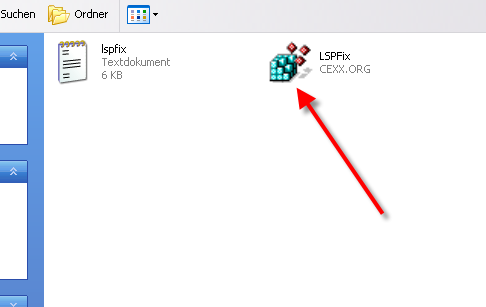
сюда два раза кликни
<----------------------------
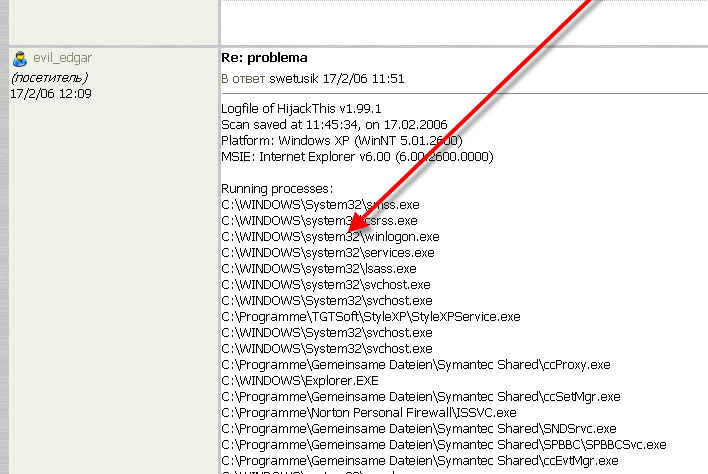
потом проверься опять HijackThis и покажи лог с HijackThis как ты делал в первый раз
<----------------------------
потом проверься опять HijackThis и покажи лог с HijackThis как ты делал в первый раз
 Прикреплённые файлы
NEW 17.02.06 14:16
в ответ evil_edgar 17.02.06 14:10
NEW 17.02.06 14:45
в ответ evil_edgar 17.02.06 14:40
 Прикреплённые файлы
NEW 17.02.06 14:50
в ответ swetusik 17.02.06 14:45
Logfile of HijackThis v1.99.1
Scan saved at 11:45:20, on 17.02.2006
Platform: Windows XP (WinNT 5.01.2600)
MSIE: Internet Explorer v6.00 (6.00.2600.0000)
Running processes:
C:\WINDOWS\System32\smss.exe
C:\WINDOWS\system32\csrss.exe
C:\WINDOWS\system32\winlogon.exe
C:\WINDOWS\system32\services.exe
C:\WINDOWS\system32\lsass.exe
C:\WINDOWS\system32\svchost.exe
C:\WINDOWS\System32\svchost.exe
C:\Programme\TGTSoft\StyleXP\StyleXPService.exe
C:\WINDOWS\System32\svchost.exe
C:\WINDOWS\System32\svchost.exe
C:\Programme\Gemeinsame Dateien\Symantec Shared\ccProxy.exe
C:\WINDOWS\Explorer.EXE
C:\Programme\Gemeinsame Dateien\Symantec Shared\ccSetMgr.exe
C:\Programme\Norton Personal Firewall\ISSVC.exe
C:\Programme\Gemeinsame Dateien\Symantec Shared\SNDSrvc.exe
C:\Programme\Gemeinsame Dateien\Symantec Shared\SPBBC\SPBBCSvc.exe
C:\Programme\Gemeinsame Dateien\Symantec Shared\ccEvtMgr.exe
C:\WINDOWS\system32\spoolsv.exe
C:\WINDOWS\System32\alg.exe
C:\Programme\T-Online\Dialerschutz-Software\DFInject.exe
C:\Programme\Gemeinsame Dateien\Symantec Shared\DJSNETCN.exe
C:\WINDOWS\System32\spool\DRIVERS\W32X86\3\LXBTserv.exe
C:\Programme\Lexmark 5200 series\lxbtbmgr.exe
C:\Programme\Ulead Systems\Ulead Photo Express 5 SE\calcheck.exe
C:\Programme\Gemeinsame Dateien\Symantec Shared\ccApp.exe
C:\Programme\T-Online\DSL-Manager\TODslMgr.exe
C:\Programme\Mouse Driver\MouseDrv.exe
C:\Programme\T-Online\T-Online_Software_6\Basis-Software\Basis1\ToADiMon.exe
C:\Programme\Gemeinsame Dateien\Real\Update_OB\realsched.exe
C:\WINDOWS\System32\ctfmon.exe
C:\Programme\Messenger\msmsgs.exe
C:\Programme\Lexmark 5200 series\lxbtbmon.exe
C:\Programme\T-Online\T-Online_Software_6\Info-Cockpit\INFOCOCKPIT.EXE
C:\Programme\Norton AntiVirus\navapsvc.exe
C:\Programme\Norton AntiVirus\IWP\NPFMntor.exe
C:\WINDOWS\System32\nvsvc32.exe
C:\WINDOWS\System32\svchost.exe
C:\Programme\Gemeinsame Dateien\Symantec Shared\CCPD-LC\symlcsvc.exe
C:\WINDOWS\System32\wdfmgr.exe
C:\Programme\T-Online\DSL-Manager\TODslSvc.exe
C:\PROGRA~1\T-Online\T-ONLI~2\BASIS-~1\Basis2\kernel.exe
C:\PROGRA~1\T-Online\T-ONLI~2\BASIS-~1\Basis2\sc_watch.exe
C:\PROGRA~1\T-Online\T-ONLI~2\Notifier\Notifier.exe
C:\PROGRA~1\T-Online\T-ONLI~2\BASIS-~1\Basis2\PROFIL~1.EXE
C:\Programme\T-Online\T-Online_Software_5\Basis-Software\Basis2\kernel.exe
C:\Programme\T-Online\T-Online_Software_5\Basis-Software\Basis2\sc_watch.exe
C:\PROGRA~1\T-Online\T-ONLI~1\BASIS-~1\Basis2\PROFIL~1.EXE
C:\PROGRAMME\T-ONLINE\T-ONLINE_SOFTWARE_5\BROWSER\BROWSER.EXE
c:\programme\t-online\t-online_software_5\browser\dlman.exe
C:\Programme\WinRAR\WinRAR.exe
C:\DOKUME~1\ALEXAN~1\LOKALE~1\Temp\Rar$EX00.133\HijackThis.exe
R0 - HKCU\Software\Microsoft\Internet Explorer\Main,Start Page = http://anekdotov.net/?start
O2 - BHO: Norton Personal Firewall - {9ECB9560-04F9-4bbc-943D-298DDF1699E1} - C:\Programme\Gemeinsame Dateien\Symantec Shared\AdBlocking\NISShExt.dll
O2 - BHO: NAV Helper - {BDF3E430-B101-42AD-A544-FADC6B084872} - C:\Programme\Norton AntiVirus\NavShExt.dll
O3 - Toolbar: Norton Personal Firewall - {0B53EAC3-8D69-4b9e-9B19-A37C9A5676A7} - C:\Programme\Gemeinsame Dateien\Symantec Shared\AdBlocking\NISShExt.dll
O3 - Toolbar: Norton AntiVirus - {42CDD1BF-3FFB-4238-8AD1-7859DF00B1D6} - C:\Programme\Norton AntiVirus\NavShExt.dll
O3 - Toolbar: &Radio - {8E718888-423F-11D2-876E-00A0C9082467} - C:\WINDOWS\System32\msdxm.ocx
O4 - HKLM\..\Run: [FaxCenterServer] "C:\Programme\Lexmark Fax Solutions\fm3032.exe" /s
O4 - HKLM\..\Run: [Lexmark 5200 series] "C:\Programme\Lexmark 5200 series\lxbtbmgr.exe"
O4 - HKLM\..\Run: [LXBTCATS] rundll32 C:\WINDOWS\System32\spool\DRIVERS\W32X86\3\LXBTtime.dll,_RunDLLEntry@16
O4 - HKLM\..\Run: [NeroFilterCheck] C:\WINDOWS\system32\NeroCheck.exe
O4 - HKLM\..\Run: [NvCplDaemon] RUNDLL32.EXE C:\WINDOWS\System32\NvCpl.dll,NvStartup
O4 - HKLM\..\Run: [nwiz] nwiz.exe /install
O4 - HKLM\..\Run: [Ulead Photo Express 5 SE Calendar Checker] C:\Programme\Ulead Systems\Ulead Photo Express 5 SE\calcheck.exe
O4 - HKLM\..\Run: [ccApp] "C:\Programme\Gemeinsame Dateien\Symantec Shared\ccApp.exe"
O4 - HKLM\..\Run: [SSC_UserPrompt] C:\Programme\Gemeinsame Dateien\Symantec Shared\Security Center\UsrPrmpt.exe
O4 - HKLM\..\Run: [Symantec NetDriver Monitor] C:\PROGRA~1\SYMNET~1\SNDMon.exe /Consumer
O4 - HKLM\..\Run: [T-Online Dialerschutz-Software] "C:\Programme\T-Online\Dialerschutz-Software\defender.exe"
O4 - HKLM\..\Run: [T-Online DSL-Manager] "C:\Programme\T-Online\DSL-Manager\TODslMgr.exe"
O4 - HKLM\..\Run: [CreativeMouse ] C:\Programme\Mouse Driver\MouseDrv.exe
O4 - HKLM\..\Run: [ToADiMon.exe] C:\Programme\T-Online\T-Online_Software_6\Basis-Software\Basis1\ToADiMon.exe -TOnlineAutodialStart
O4 - HKLM\..\Run: [TkBellExe] "C:\Programme\Gemeinsame Dateien\Real\Update_OB\realsched.exe" -osboot
O4 - HKLM\..\RunServices: [DJSNetCN] C:\Programme\Gemeinsame Dateien\Symantec Shared\DJSNETCN.exe
O4 - HKCU\..\Run: [CTFMON.EXE] C:\WINDOWS\System32\ctfmon.exe
O4 - HKCU\..\Run: [MSMSGS] "C:\Programme\Messenger\msmsgs.exe" /background
O4 - HKCU\..\Run: [STYLEXP] C:\Programme\TGTSoft\StyleXP\StyleXP.exe -Hide
O4 - HKCU\..\Run: [InfoCockpit] C:\Programme\T-Online\T-Online_Software_6\Info-Cockpit\INFOCOCKPIT.EXE /nosplash
O8 - Extra context menu item: Nach Microsoft &Excel exportieren - res://C:\PROGRA~1\MICROS~2\Office10\EXCEL.EXE/3000
O9 - Extra button: Related - {c95fe080-8f5d-11d2-a20b-00aa003c157a} - C:\WINDOWS\web\related.htm
O9 - Extra 'Tools' menuitem: Show &Related Links - {c95fe080-8f5d-11d2-a20b-00aa003c157a} - C:\WINDOWS\web\related.htm
O9 - Extra button: (no name) - {FFFFFFFF-ABBB-FFFF-FFFF-FFFFFFFFFFFF} - http://top.holm.ru/cgi-bin/link.cgi?l=book (file missing)
O9 - Extra 'Tools' menuitem: FUNNY SEXY PICTURES - {FFFFFFFF-ABBB-FFFF-FFFF-FFFFFFFFFFFF} - http://top.holm.ru/cgi-bin/link.cgi?l=book (file missing)
O10 - Unknown file in Winsock LSP: c:\windows\system32\spacklsp.dll
O10 - Unknown file in Winsock LSP: c:\windows\system32\spacklsp.dll
O10 - Unknown file in Winsock LSP: c:\windows\system32\spacklsp.dll
O10 - Unknown file in Winsock LSP: c:\windows\system32\spacklsp.dll
O10 - Unknown file in Winsock LSP: c:\windows\system32\spacklsp.dll
O10 - Unknown file in Winsock LSP: c:\windows\system32\spacklsp.dll
O16 - DPF: {56336BCB-3D8A-11D6-A00B-0050DA18DE71} (RdxIE Class) - http://software-dl.real.com/2050fddfeb4c2353b318/netzip/RdxIE601_de.cab
O17 - HKLM\System\CCS\Services\Tcpip\..\{5A9F074C-841F-447D-AEA3-0A59966079A5}: NameServer = 217.237.149.161 217.237.151.225
O23 - Service: Symantec Event Manager (ccEvtMgr) - Symantec Corporation - C:\Programme\Gemeinsame Dateien\Symantec Shared\ccEvtMgr.exe
O23 - Service: Symantec Network Proxy (ccProxy) - Symantec Corporation - C:\Programme\Gemeinsame Dateien\Symantec Shared\ccProxy.exe
O23 - Service: Symantec Password Validation (ccPwdSvc) - Symantec Corporation - C:\Programme\Gemeinsame Dateien\Symantec Shared\ccPwdSvc.exe
O23 - Service: Symantec Settings Manager (ccSetMgr) - Symantec Corporation - C:\Programme\Gemeinsame Dateien\Symantec Shared\ccSetMgr.exe
O23 - Service: Dialerschutz Dienst (DFSVC) - Unknown owner - C:\Programme\T-Online\Dialerschutz-Software\DFInject.exe
O23 - Service: Symantec Licensing Detect Internet Connection (DJSNETCN) - Symantec Corporation - C:\Programme\Gemeinsame Dateien\Symantec Shared\DJSNETCN.exe
O23 - Service: ISSvc (ISSVC) - Symantec Corporation - C:\Programme\Norton Personal Firewall\ISSVC.exe
O23 - Service: LXBTCustomerConnect - Lexmark International, Inc. - C:\WINDOWS\System32\spool\DRIVERS\W32X86\3\LXBTserv.exe
O23 - Service: lxbt_device - Lexmark International, Inc. - C:\WINDOWS\System32\lxbtcoms.exe
O23 - Service: Norton AntiVirus Auto-Protect-Dienst (navapsvc) - Symantec Corporation - C:\Programme\Norton AntiVirus\navapsvc.exe
O23 - Service: Norton AntiVirus Firewall Monitor Service (NPFMntor) - Symantec Corporation - C:\Programme\Norton AntiVirus\IWP\NPFMntor.exe
O23 - Service: NVIDIA Driver Helper Service (NVSvc) - NVIDIA Corporation - C:\WINDOWS\System32\nvsvc32.exe
O23 - Service: SAVScan - Symantec Corporation - C:\Programme\Norton AntiVirus\SAVScan.exe
O23 - Service: ScriptBlocking Service (SBService) - Symantec Corporation - C:\PROGRA~1\GEMEIN~1\SYMANT~1\SCRIPT~1\SBServ.exe
O23 - Service: Symantec Network Drivers Service (SNDSrvc) - Symantec Corporation - C:\Programme\Gemeinsame Dateien\Symantec Shared\SNDSrvc.exe
O23 - Service: Symantec SPBBCSvc (SPBBCSvc) - Symantec Corporation - C:\Programme\Gemeinsame Dateien\Symantec Shared\SPBBC\SPBBCSvc.exe
O23 - Service: StyleXPService - Unknown owner - C:\Programme\TGTSoft\StyleXP\StyleXPService.exe
O23 - Service: Symantec Core LC - Symantec Corporation - C:\Programme\Gemeinsame Dateien\Symantec Shared\CCPD-LC\symlcsvc.exe
O23 - Service: T-Online DSL-Manager (TODslService) - T-Systems International GmbH - C:\Programme\T-Online\DSL-Manager\TODslSvc.exe
O23 - Service: TSMService - T-Systems Nova, Berkom - C:\Programme\T-DSL SpeedManager\tsmsvc.exe
Scan saved at 11:45:20, on 17.02.2006
Platform: Windows XP (WinNT 5.01.2600)
MSIE: Internet Explorer v6.00 (6.00.2600.0000)
Running processes:
C:\WINDOWS\System32\smss.exe
C:\WINDOWS\system32\csrss.exe
C:\WINDOWS\system32\winlogon.exe
C:\WINDOWS\system32\services.exe
C:\WINDOWS\system32\lsass.exe
C:\WINDOWS\system32\svchost.exe
C:\WINDOWS\System32\svchost.exe
C:\Programme\TGTSoft\StyleXP\StyleXPService.exe
C:\WINDOWS\System32\svchost.exe
C:\WINDOWS\System32\svchost.exe
C:\Programme\Gemeinsame Dateien\Symantec Shared\ccProxy.exe
C:\WINDOWS\Explorer.EXE
C:\Programme\Gemeinsame Dateien\Symantec Shared\ccSetMgr.exe
C:\Programme\Norton Personal Firewall\ISSVC.exe
C:\Programme\Gemeinsame Dateien\Symantec Shared\SNDSrvc.exe
C:\Programme\Gemeinsame Dateien\Symantec Shared\SPBBC\SPBBCSvc.exe
C:\Programme\Gemeinsame Dateien\Symantec Shared\ccEvtMgr.exe
C:\WINDOWS\system32\spoolsv.exe
C:\WINDOWS\System32\alg.exe
C:\Programme\T-Online\Dialerschutz-Software\DFInject.exe
C:\Programme\Gemeinsame Dateien\Symantec Shared\DJSNETCN.exe
C:\WINDOWS\System32\spool\DRIVERS\W32X86\3\LXBTserv.exe
C:\Programme\Lexmark 5200 series\lxbtbmgr.exe
C:\Programme\Ulead Systems\Ulead Photo Express 5 SE\calcheck.exe
C:\Programme\Gemeinsame Dateien\Symantec Shared\ccApp.exe
C:\Programme\T-Online\DSL-Manager\TODslMgr.exe
C:\Programme\Mouse Driver\MouseDrv.exe
C:\Programme\T-Online\T-Online_Software_6\Basis-Software\Basis1\ToADiMon.exe
C:\Programme\Gemeinsame Dateien\Real\Update_OB\realsched.exe
C:\WINDOWS\System32\ctfmon.exe
C:\Programme\Messenger\msmsgs.exe
C:\Programme\Lexmark 5200 series\lxbtbmon.exe
C:\Programme\T-Online\T-Online_Software_6\Info-Cockpit\INFOCOCKPIT.EXE
C:\Programme\Norton AntiVirus\navapsvc.exe
C:\Programme\Norton AntiVirus\IWP\NPFMntor.exe
C:\WINDOWS\System32\nvsvc32.exe
C:\WINDOWS\System32\svchost.exe
C:\Programme\Gemeinsame Dateien\Symantec Shared\CCPD-LC\symlcsvc.exe
C:\WINDOWS\System32\wdfmgr.exe
C:\Programme\T-Online\DSL-Manager\TODslSvc.exe
C:\PROGRA~1\T-Online\T-ONLI~2\BASIS-~1\Basis2\kernel.exe
C:\PROGRA~1\T-Online\T-ONLI~2\BASIS-~1\Basis2\sc_watch.exe
C:\PROGRA~1\T-Online\T-ONLI~2\Notifier\Notifier.exe
C:\PROGRA~1\T-Online\T-ONLI~2\BASIS-~1\Basis2\PROFIL~1.EXE
C:\Programme\T-Online\T-Online_Software_5\Basis-Software\Basis2\kernel.exe
C:\Programme\T-Online\T-Online_Software_5\Basis-Software\Basis2\sc_watch.exe
C:\PROGRA~1\T-Online\T-ONLI~1\BASIS-~1\Basis2\PROFIL~1.EXE
C:\PROGRAMME\T-ONLINE\T-ONLINE_SOFTWARE_5\BROWSER\BROWSER.EXE
c:\programme\t-online\t-online_software_5\browser\dlman.exe
C:\Programme\WinRAR\WinRAR.exe
C:\DOKUME~1\ALEXAN~1\LOKALE~1\Temp\Rar$EX00.133\HijackThis.exe
R0 - HKCU\Software\Microsoft\Internet Explorer\Main,Start Page = http://anekdotov.net/?start
O2 - BHO: Norton Personal Firewall - {9ECB9560-04F9-4bbc-943D-298DDF1699E1} - C:\Programme\Gemeinsame Dateien\Symantec Shared\AdBlocking\NISShExt.dll
O2 - BHO: NAV Helper - {BDF3E430-B101-42AD-A544-FADC6B084872} - C:\Programme\Norton AntiVirus\NavShExt.dll
O3 - Toolbar: Norton Personal Firewall - {0B53EAC3-8D69-4b9e-9B19-A37C9A5676A7} - C:\Programme\Gemeinsame Dateien\Symantec Shared\AdBlocking\NISShExt.dll
O3 - Toolbar: Norton AntiVirus - {42CDD1BF-3FFB-4238-8AD1-7859DF00B1D6} - C:\Programme\Norton AntiVirus\NavShExt.dll
O3 - Toolbar: &Radio - {8E718888-423F-11D2-876E-00A0C9082467} - C:\WINDOWS\System32\msdxm.ocx
O4 - HKLM\..\Run: [FaxCenterServer] "C:\Programme\Lexmark Fax Solutions\fm3032.exe" /s
O4 - HKLM\..\Run: [Lexmark 5200 series] "C:\Programme\Lexmark 5200 series\lxbtbmgr.exe"
O4 - HKLM\..\Run: [LXBTCATS] rundll32 C:\WINDOWS\System32\spool\DRIVERS\W32X86\3\LXBTtime.dll,_RunDLLEntry@16
O4 - HKLM\..\Run: [NeroFilterCheck] C:\WINDOWS\system32\NeroCheck.exe
O4 - HKLM\..\Run: [NvCplDaemon] RUNDLL32.EXE C:\WINDOWS\System32\NvCpl.dll,NvStartup
O4 - HKLM\..\Run: [nwiz] nwiz.exe /install
O4 - HKLM\..\Run: [Ulead Photo Express 5 SE Calendar Checker] C:\Programme\Ulead Systems\Ulead Photo Express 5 SE\calcheck.exe
O4 - HKLM\..\Run: [ccApp] "C:\Programme\Gemeinsame Dateien\Symantec Shared\ccApp.exe"
O4 - HKLM\..\Run: [SSC_UserPrompt] C:\Programme\Gemeinsame Dateien\Symantec Shared\Security Center\UsrPrmpt.exe
O4 - HKLM\..\Run: [Symantec NetDriver Monitor] C:\PROGRA~1\SYMNET~1\SNDMon.exe /Consumer
O4 - HKLM\..\Run: [T-Online Dialerschutz-Software] "C:\Programme\T-Online\Dialerschutz-Software\defender.exe"
O4 - HKLM\..\Run: [T-Online DSL-Manager] "C:\Programme\T-Online\DSL-Manager\TODslMgr.exe"
O4 - HKLM\..\Run: [CreativeMouse ] C:\Programme\Mouse Driver\MouseDrv.exe
O4 - HKLM\..\Run: [ToADiMon.exe] C:\Programme\T-Online\T-Online_Software_6\Basis-Software\Basis1\ToADiMon.exe -TOnlineAutodialStart
O4 - HKLM\..\Run: [TkBellExe] "C:\Programme\Gemeinsame Dateien\Real\Update_OB\realsched.exe" -osboot
O4 - HKLM\..\RunServices: [DJSNetCN] C:\Programme\Gemeinsame Dateien\Symantec Shared\DJSNETCN.exe
O4 - HKCU\..\Run: [CTFMON.EXE] C:\WINDOWS\System32\ctfmon.exe
O4 - HKCU\..\Run: [MSMSGS] "C:\Programme\Messenger\msmsgs.exe" /background
O4 - HKCU\..\Run: [STYLEXP] C:\Programme\TGTSoft\StyleXP\StyleXP.exe -Hide
O4 - HKCU\..\Run: [InfoCockpit] C:\Programme\T-Online\T-Online_Software_6\Info-Cockpit\INFOCOCKPIT.EXE /nosplash
O8 - Extra context menu item: Nach Microsoft &Excel exportieren - res://C:\PROGRA~1\MICROS~2\Office10\EXCEL.EXE/3000
O9 - Extra button: Related - {c95fe080-8f5d-11d2-a20b-00aa003c157a} - C:\WINDOWS\web\related.htm
O9 - Extra 'Tools' menuitem: Show &Related Links - {c95fe080-8f5d-11d2-a20b-00aa003c157a} - C:\WINDOWS\web\related.htm
O9 - Extra button: (no name) - {FFFFFFFF-ABBB-FFFF-FFFF-FFFFFFFFFFFF} - http://top.holm.ru/cgi-bin/link.cgi?l=book (file missing)
O9 - Extra 'Tools' menuitem: FUNNY SEXY PICTURES - {FFFFFFFF-ABBB-FFFF-FFFF-FFFFFFFFFFFF} - http://top.holm.ru/cgi-bin/link.cgi?l=book (file missing)
O10 - Unknown file in Winsock LSP: c:\windows\system32\spacklsp.dll
O10 - Unknown file in Winsock LSP: c:\windows\system32\spacklsp.dll
O10 - Unknown file in Winsock LSP: c:\windows\system32\spacklsp.dll
O10 - Unknown file in Winsock LSP: c:\windows\system32\spacklsp.dll
O10 - Unknown file in Winsock LSP: c:\windows\system32\spacklsp.dll
O10 - Unknown file in Winsock LSP: c:\windows\system32\spacklsp.dll
O16 - DPF: {56336BCB-3D8A-11D6-A00B-0050DA18DE71} (RdxIE Class) - http://software-dl.real.com/2050fddfeb4c2353b318/netzip/RdxIE601_de.cab
O17 - HKLM\System\CCS\Services\Tcpip\..\{5A9F074C-841F-447D-AEA3-0A59966079A5}: NameServer = 217.237.149.161 217.237.151.225
O23 - Service: Symantec Event Manager (ccEvtMgr) - Symantec Corporation - C:\Programme\Gemeinsame Dateien\Symantec Shared\ccEvtMgr.exe
O23 - Service: Symantec Network Proxy (ccProxy) - Symantec Corporation - C:\Programme\Gemeinsame Dateien\Symantec Shared\ccProxy.exe
O23 - Service: Symantec Password Validation (ccPwdSvc) - Symantec Corporation - C:\Programme\Gemeinsame Dateien\Symantec Shared\ccPwdSvc.exe
O23 - Service: Symantec Settings Manager (ccSetMgr) - Symantec Corporation - C:\Programme\Gemeinsame Dateien\Symantec Shared\ccSetMgr.exe
O23 - Service: Dialerschutz Dienst (DFSVC) - Unknown owner - C:\Programme\T-Online\Dialerschutz-Software\DFInject.exe
O23 - Service: Symantec Licensing Detect Internet Connection (DJSNETCN) - Symantec Corporation - C:\Programme\Gemeinsame Dateien\Symantec Shared\DJSNETCN.exe
O23 - Service: ISSvc (ISSVC) - Symantec Corporation - C:\Programme\Norton Personal Firewall\ISSVC.exe
O23 - Service: LXBTCustomerConnect - Lexmark International, Inc. - C:\WINDOWS\System32\spool\DRIVERS\W32X86\3\LXBTserv.exe
O23 - Service: lxbt_device - Lexmark International, Inc. - C:\WINDOWS\System32\lxbtcoms.exe
O23 - Service: Norton AntiVirus Auto-Protect-Dienst (navapsvc) - Symantec Corporation - C:\Programme\Norton AntiVirus\navapsvc.exe
O23 - Service: Norton AntiVirus Firewall Monitor Service (NPFMntor) - Symantec Corporation - C:\Programme\Norton AntiVirus\IWP\NPFMntor.exe
O23 - Service: NVIDIA Driver Helper Service (NVSvc) - NVIDIA Corporation - C:\WINDOWS\System32\nvsvc32.exe
O23 - Service: SAVScan - Symantec Corporation - C:\Programme\Norton AntiVirus\SAVScan.exe
O23 - Service: ScriptBlocking Service (SBService) - Symantec Corporation - C:\PROGRA~1\GEMEIN~1\SYMANT~1\SCRIPT~1\SBServ.exe
O23 - Service: Symantec Network Drivers Service (SNDSrvc) - Symantec Corporation - C:\Programme\Gemeinsame Dateien\Symantec Shared\SNDSrvc.exe
O23 - Service: Symantec SPBBCSvc (SPBBCSvc) - Symantec Corporation - C:\Programme\Gemeinsame Dateien\Symantec Shared\SPBBC\SPBBCSvc.exe
O23 - Service: StyleXPService - Unknown owner - C:\Programme\TGTSoft\StyleXP\StyleXPService.exe
O23 - Service: Symantec Core LC - Symantec Corporation - C:\Programme\Gemeinsame Dateien\Symantec Shared\CCPD-LC\symlcsvc.exe
O23 - Service: T-Online DSL-Manager (TODslService) - T-Systems International GmbH - C:\Programme\T-Online\DSL-Manager\TODslSvc.exe
O23 - Service: TSMService - T-Systems Nova, Berkom - C:\Programme\T-DSL SpeedManager\tsmsvc.exe
NEW 17.02.06 16:51
в ответ evil_edgar 17.02.06 14:50
Попробуй ещ╦ раз той программой, которую я дала.
Почему не удалил hijackthis-ом те файлы, что писала выше:
O9 - Extra button: Related - {c95fe080-8f5d-11d2-a20b-00aa003c157a} - C:\WINDOWS\web\related.htm
O9 - Extra button: (no name) - {FFFFFFFF-ABBB-FFFF-FFFF-FFFFFFFFFFFF} - http://top.holm.ru/cgi-bin/link.cgi?l=book (file missing)
O9 - Extra 'Tools' menuitem: FUNNY SEXY PICTURES - {FFFFFFFF-ABBB-FFFF-FFFF-FFFFFFFFFFFF} - http://top.holm.ru/cgi-bin/link.cgi?l=book (file missing)
Почему не удалил hijackthis-ом те файлы, что писала выше:
O9 - Extra button: Related - {c95fe080-8f5d-11d2-a20b-00aa003c157a} - C:\WINDOWS\web\related.htm
O9 - Extra button: (no name) - {FFFFFFFF-ABBB-FFFF-FFFF-FFFFFFFFFFFF} - http://top.holm.ru/cgi-bin/link.cgi?l=book (file missing)
O9 - Extra 'Tools' menuitem: FUNNY SEXY PICTURES - {FFFFFFFF-ABBB-FFFF-FFFF-FFFFFFFFFFFF} - http://top.holm.ru/cgi-bin/link.cgi?l=book (file missing)
 Прикреплённые файлы
NEW 17.02.06 17:27
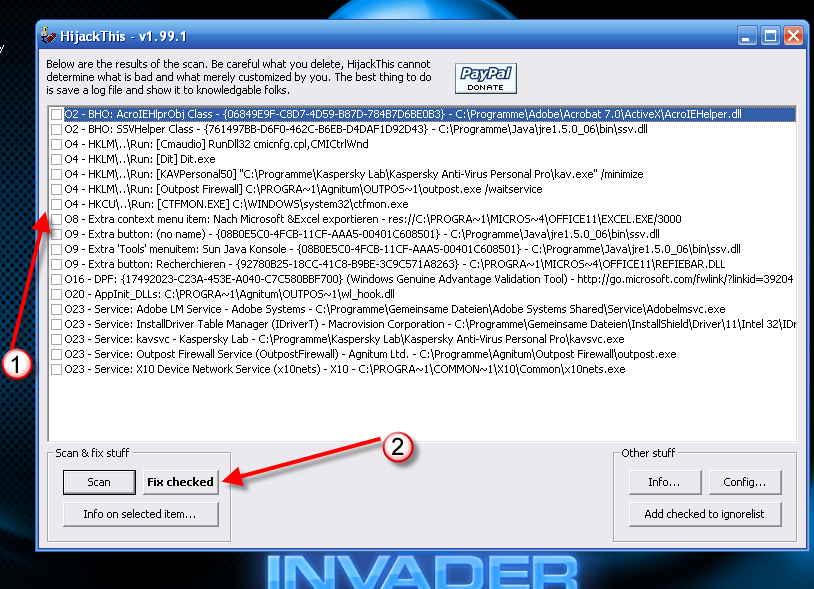
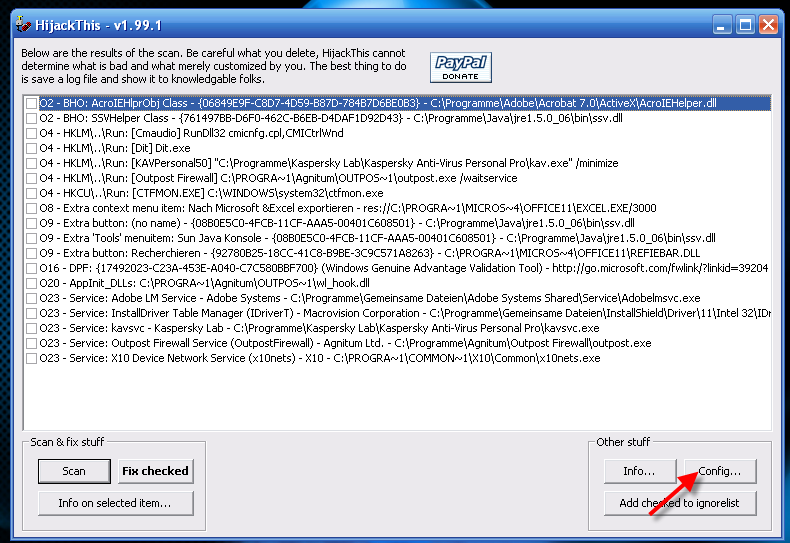
Это я насчёт HijackThis-а 
Запускай программу по новой, напротив этих процессов ставь галочки
O9 - Extra button: Related - {c95fe080-8f5d-11d2-a20b-00aa003c157a} - C:\WINDOWS\web\related.htm
O9 - Extra button: (no name) - {FFFFFFFF-ABBB-FFFF-FFFF-FFFFFFFFFFFF} - http://top.holm.ru/cgi-bin/link.cgi?l=book (file missing)
O9 - Extra 'Tools' menuitem: FUNNY SEXY PICTURES - {FFFFFFFF-ABBB-FFFF-FFFF-FFFFFFFFFFFF} - http://top.holm.ru/cgi-bin/link.cgi?l=book (file missing)
потом жмёшь Fix checked
Запускай программу по новой, напротив этих процессов ставь галочки
O9 - Extra button: Related - {c95fe080-8f5d-11d2-a20b-00aa003c157a} - C:\WINDOWS\web\related.htm
O9 - Extra button: (no name) - {FFFFFFFF-ABBB-FFFF-FFFF-FFFFFFFFFFFF} - http://top.holm.ru/cgi-bin/link.cgi?l=book (file missing)
O9 - Extra 'Tools' menuitem: FUNNY SEXY PICTURES - {FFFFFFFF-ABBB-FFFF-FFFF-FFFFFFFFFFFF} - http://top.holm.ru/cgi-bin/link.cgi?l=book (file missing)
потом жмёшь Fix checked
 Прикреплённые файлы
 Прикреплённые файлы
 Прикреплённые файлы
NEW 17.02.06 17:41
в ответ swetusik 17.02.06 17:39
 Прикреплённые файлы